
Top 9 Best Micro ATX Motherboards in 2023
When building your ideal gaming setup the motherboard is the main circuit board on your system. Buying a reliable and high-quality one is a top priority. There are various options for the best Micro ATX Motherboard on market but not all can connect with your processor. We have prepared a list of budget and high-quality motherboards for Intel and AMD CPUs. This short guide about the best Micro ATX Motherboards makes your shopping adventure fast and simple.
Comparison Table



1. ASUS PRIME Z690M-Plus D4
 For Intel users, the Micro ATX Motherboard in an affordable price range is ASUS PRIME Z690M-PLUS. The motherboard is equipped with the latest LGA1700 Socket. Along with this PCLe, 5 graphic interface provides improved connectivity. ASUS has managed to squeeze in a Pcle 4 and two Pcle 3 slots into this motherboard for additional card support. Triple M. 2 slots will give you a quick load time with high boot-up speed.
Also read: Best Motherboards for Ryzen 5 5600X
The micro ATX Motherboard is designed with an OptiMem II layout that lets you hit high frequencies with low voltage and maximizes the system performance. The large VRM heatsinks with hybrid fan headers are placed for comprehensive cooling of your system. The prime Z690M plus has a total of three M. 2 slots that allow better data transfer speeds. Front and rear Type C USB connectors have a transmission speed of up to 20 Gigabytes per second.
SPECIFICATIONS
| CPU SOCKET | LGA 1700 |
| Memory support | DDR4 |
| RAM | 128 GB |
| Chipset type | Intel |
| Graphic interface | PCl express |
FEATURES
- Supports 12th generation intel core processors
- Pro cool sockets paired with durable capacitors deliver stable power
- Large heatsinks with hybrid fans for comprehensive cooling
- Improved memory performance with ASUS OptiMem II layout
- Expandability
- The silver color matches well with other components
- Nice and sleek built
- Just one Ethernet Gig
- Very basic audio Chipset
[su_button url=”https://www.amazon.com/ASUS-Z690M-Plus-D4-motherboard-Thunderbolt/dp/B09JRW446Z?tag=hexa23-20″ target=”blank” background=”#0098D3″ center=”yes” size=”10″ rel=”sponsored”]Check Price[/su_button][su_divider top=”no” divider_color=”#0098D3″ link_color=”#0098D3″]
WHY BUY ASUS PRIME Z690M-Plus D4?
For the price, ASUS has to offer the best affordable motherboard for the latest Intel processors. With features like Pcle 5 support and Triple M. 2 slots, you are surely gonna experience a great performance capability. While power is on self-test the Q LED core displays a different LED pattern that helps troubleshoot issues. The latest ASUS Thunderbolt 4 add-on card enables bidirectional speeds of up to 40 Gigabytes per second.
2. MSI MPG Z490M Gaming Edge
 For supporting the 10th and 11th generation intel processors the MSI MPG Z490M Gaming Edge is a perfect choice. The MSI motherboard has 2.5 Gbps LAN with wifi 6 connectivity that delivers incredibly faster speed up to 2400 Mbps. The LAN manager prioritizes latency-sensitive apps and thus delivers the best gaming experience with minimum latency. You can set up 4 different temperature ranges for the motherboard and the system adjusts fan speeds accordingly.
Also read: Best motherboards for video editing
Equipped with a pre-installed I/O shield that protects from electrostatic discharge. The package comes with installation cables, a user manual, and a DVD. Powered by Asmedia USB 3.2 Gen 2×2 controller offers a USB speed of up to 20 Gb per second from the rear USB port. Twin Turbo M. 2 has fast transfer speeds up to 32 GB per second. The aluminum cover motherboard with Mystic lights will surely be a great addition to your setup.
SPECIFICATIONS
| CPU SOCKET | LGA 1200 |
| Memory support | DDR4 |
| RAM Memory | 128 GB |
| Chipset type | Intel |
| Graphic interface | Pcle 3 |
FEATURES
- The 2.5G LAN provides the latest connectivity
- Pre-installed I/O shielding
- Wifi 6 connectivity provides high-quality gaming
- Compatible with 10th and 11th generation intel processors
- Comprehensive water cooling
- RGB support
- Comes with a pre-installed I/O shield
- Slow tech support
[su_button url=”https://www.amazon.com/MSI-MPG-Z490-Gaming-Motherboard/dp/B0876J8436?tag=hexa23-20″ target=”blank” background=”#0098D3″ center=”yes” size=”10″ rel=”sponsored”]Check Price[/su_button][su_divider top=”no” divider_color=”#0098D3″ link_color=”#0098D3″]
WHY BUY MSI MPG Z490M Gaming Edge?
The MSI MPG Z490M GAMING EDGE has dual channel DDR4 memory support with up to 128 GB memory capacity. You can experience high transfer speeds of 32 GB per second with the twin-turbo M. 2. For pairing up your 10 and 11th-generation intel processors the unit will be a perfect fit. The pre-installed I/O shielding protects from electrostatic discharges. The Wifi 6 connectivity is another highlight you will be delighted to use.
3. ASUS TUF B550M-PLUS AMD
 For enthusiastic gamers in search of a powerful motherboard, the Asus TUF Gaming B550M-Plus will be the right option. This power-packed device has an AM4 processor Socket. The B550 series is thus highly compatible with AMD 3rd Generation Ryzen processors. The DDR4 memory technology comes with a maximum RAM size of 128 GB. The 4 memory slots provide a sufficient storage option for improved gaming.
Also read: Best Budget GPUs
The ASUS TUF comes with an Optimized thermal design for keeping the system cool while you enjoy high-end graphics. The fanless VRM with the Chipset heatsink and hybrid fan headers is a proficient cooling system. The AI noise-canceling software provides for an immersive gaming experience. The audio software is with all 3.5 mm headsets. The dual M. 2 slots have Pcle 4 connectivity with USB 3.2 Gem 2 type C and type A ports.
SPECIFICATIONS
| CPU SOCKET | AM4 |
| Memory support | DDR4 |
| RAM Memory | 128 GB |
| Chipset type | AMD B550 |
| Graphic interface | PCle 4 |
FEATURES
- Multiple hybrid fans with a Chipset heatsink for optimized thermal solution
- High-quality alloy chokes for robust power delivery
- HDMI and display port provide the best gaming connectivity
- AI noise canceling mic
- Maximum storage flexibility
- Fast data speeds
- AI noise cancelation eliminates keyboard clatter
- The user manual lacks details
[su_button url=”https://www.amazon.com/ASUS-TUF-B550M-PLUS-Motherboard-Addressable/dp/B088W66DQ7?tag=hexa23-20″ target=”blank” background=”#0098D3″ center=”yes” size=”10″ rel=”sponsored”]Check Price[/su_button][su_divider top=”no” divider_color=”#0098D3″ link_color=”#0098D3″]
WHY BUY ASUS TUF B550M-PLUS AMD AM4 Micro-ATX Motherboard?
AMD motherboards are generally most preferred cause Ryzen CPUs are more energy efficient than their Intel counterparts. This means you need a smaller cooling system for dissipating heat. For those with small-sized cases, this will be a big plus sign. The ASUS TUF B550M-PLUS is the best Micro ATX Motherboard you can find for your Ryzen CPU. To stay connected online B550 has integrated Wifi 6 so you do not need any Wifi expansion cards.
4. MSI MAG B550M Mortar
 Inquire any SFF builder about the challenges they face and you will know that overclocking damages the components permanently and cooling is not efficient. The Mortar has an 8+2+1 design making a total of 11 phases which is quite impressive for a Micro ATX Motherboard. Coming to cooling now expect an extended heatsink with thermal pads and a 2oz thick copper covering. The pre-installed I/O shield enhances durability as well.
Also read: Can a Laptop Processor Be Upgraded?
The built design is pretty minimal. If you want a basic setup with no RGBs this will be an interesting pick. In short, if you are searching for a solid Micro ATX Motherboard for your Ryzen CPU that can afford some overclocking the MSI MAG B550M Mortar will be the right affordable pick. The B550M has great VRM with a durable build so you can ensure a long-term investment. This is a suitable motherboard for professional users.
SPECIFICATIONS
| CPU SOCKET | AM4 |
| Memory support | DDR4 |
| RAM Memory | 128 GB |
| Chipset type | AMD B550 |
| Graphic interface | PCle 4 |
FEATURES
- Audio boost with studio-grade sound provides an immersive gaming
- Additional choke thermal pads with 7W/mK
- Efficient power system for precise current output
- Up to 64 GB per second unidirectional transfer bandwidth
- Metal I/O shield keeps VRM low
- User-friendly BIOS with frequent updates
- Great PCB quality
- Lacks wifi connectivity
- Fewer USB ports in back
- BIOS reset poorly positioned
[su_button url=”https://www.amazon.com/MSI-MAG-B550M-Motherboard-Processors/dp/B089CSPTRH?tag=hexa23-20″ target=”blank” background=”#0098D3″ center=”yes” size=”10″ rel=”sponsored”]Check Price[/su_button][su_divider top=”no” divider_color=”#0098D3″ link_color=”#0098D3″]
WHY BUY MSI MAG B550M Mortar?
Fast, reliable, and stable the MSI MAG B550M Mortar has all these qualities. For stable overclocking, this motherboard is an affordable pick. The BIOS features are updated regularly and are all you can want from any latest motherboard. The competitive price is like icing on the cake. One main drawback you must be aware of is that it lacks wifi connectivity so you will have to get an expansion card. Purchase a Wifi 6 card from Amazon for improved connectivity.
5. ASRock B450M STEEL LEGEND
 The fancy RGBs on the board look pretty cool. The board is an all round pick for the price point.With ASRock it is easy to overclock everything. Efficient heatsinks maintain the system acceptably cool. The simple and easy to mavigate BIOS makes it a hot favorite for beginner gamers.
Also read: Best GPU for Ryzen 5 3600
This great built quality unit comes well packaged. The appearance quality and design of this system make it the best AMD micro atx motherboard. One thing that can be significantly improved in this system is wifi connectivity. This might not be a big deal for some cause many motherboards in this price tag lack this feature.
SPECIFICATIONS
| CPU SOCKET | AM4 |
| Memory Support | DDR4 |
| RAM Memory | 64 GB |
| Chipset Type | B450 |
| Graphic interface | Pcle 2 |
FEATURES
- AMD Quad crossfire technology support
- High definition Audio
- Aluminum alloy heatsinks
- Metal Pcle 16 slot
- Best onboard audio system
- Bright RGBs
- Easy to overclock
- Complex poly chrome software
- No Wi-Fi option
[su_button url=”https://www.amazon.com/ASRock-B450M-Promontory-CrossFireX-Motherboard/dp/B07MV9BMNY?tag=hexa23-20″ target=”blank” background=”#0098D3″ center=”yes” size=”10″ rel=”sponsored”]Check Price[/su_button][su_divider top=”no” divider_color=”#0098D3″ link_color=”#0098D3″]
WHY BUY ASRock B450M STEEL LEGEND?
If you love RGBs so this board will make sense with your setup. The poly Chrome RGB software can control all the RGB headers. Poly Chrome can additionally control RGB on video cards, keyboards, and headsets. The aesthetics peak on with a digital camo look featuring a combo of white gray and black. The clear manual makes it a breeze to fit the board into your system. You get all the connectors with it making it a good budget board.
6. GIGABYTE AB350M-DS3H
 The Gigabyte AB350M-DS3H is not a brand new one but certainly not an old one as well. Considering its release and features it is a great contender for best Micro ATX Motherboard. This motherboard has 4 RAM slots making it easy to store and access your data. The dual Pcle 16 slots mean you can maximize the card’s performance. The motherboard has a beautiful RGB strip that makes it a colorful and attractive purchase for lively gamers.
Also read: Best External Graphics Cards
If you want a mid-range gaming setup that works perfectly for your budget and delivers amazing gaming performance too the Gigabyte AB350M-DS3H is a good pick. The BIOS works well and makes it easy to manage everything for this board. The RGBs come with plenty of settings that are easy to configure and can be switched off when not needed. The manual is very clear and provides good help for pairing up all parts together.
SPECIFICATIONS
| CPU Socket | AM4 |
| Memory support | DDR4 |
| RAM | 64 GB |
| Chipset type | B350 |
| Graphic interface | PCle-16 slots |
FEATURES
- Dual Channel Unbuffered DDR4
- 7 color RGB LED strips
- High-quality audio capacitors
- Supports 7th generation processors
- Fancy RGBs
- Great onboard sound
- Well packaged
- The PCIe slots are packed together
- Doesn’t come with updated BIOS
[su_button url=”https://www.amazon.com/GIGABYTE-GA-AB350M-DS3H-Ryzen-Fusion-Motherboard/dp/B079NH98GS?tag=hexa23-20″ target=”blank” background=”#0098D3″ center=”yes” size=”10″ rel=”sponsored”]Check Price[/su_button][su_divider top=”no” divider_color=”#0098D3″ link_color=”#0098D3″]
WHY BUY GIGABYTE AB350M-DS3H?
Gigabyte AB350M-DS3H has support for AMD Ryzen and 7th generation processors. Audio noise guard ensures high-quality audio while gaming. For RGB freaks this unit has a lot to offer. You get a 7-color LED strip. The smart fan 5 features 5 temperature sensors so the temperature is well maintained. Along with it, you get two fan headers. The box of AB350M includes a manual that helps to understand and operate your board better.
7. ASUS ROG Strix Z690-G Gaming WiFi
 Going for a micro ATX Motherboard doesn’t mean you have to miss out on the high-end features a full-sized motherboard can offer. The ASUS ROG Strix Z690-G comes with support for the latest Intel 12th generation processors. Due to the PCIe 5 support on this motherboard, you can take full advantage of the bandwidth. With three M. 2 slots, you get high-speed loading. This beast comes with DDR5 RAM support so you overclock at a wild 6000MHz. This all is possible with minimal voltage use.
Also read: Best DDR5 RAM for gaming
Besides offering several high-speed ports ranging from 5 Gbps to 20 Gbps. Asus has also loading support for fast internet. You can get a wired connection with 2.5 GB Ethernet connectivity or go for wireless connectivity with WIFI 6E. This unit is the pricier of Micro ATX Motherboards but the features that compete with a full-sized motherboard make it worth the cost. The DIY-friendly build enables you to quickly assemble your unit.
SPECIFICATIONS
| CPU Socket | LGA 1700 |
| Memory support | DDR5 |
| RAM | 128 GB |
| Chipset type | Intel Z690 |
| Graphic interface | PCIe |
FEATURES
- Fanless heatsink with hybrid fan headers
- AI overclocking, cooling and networking
- Windows 11 ready
- 14+1 power stages provide robust power
- Easy to install
- Best for high-end tasks like programming
- Software monitored fan speed
- Lack of swift tech support
[su_button url=”https://www.amazon.com/ASUS-ROG-Z690-G-motherboard-Thunderbolt/dp/B09JRVXRJC?tag=hexa23-20″ target=”blank” background=”#0098D3″ center=”yes” size=”10″ rel=”sponsored”]Check Price[/su_button][su_divider top=”no” divider_color=”#0098D3″ link_color=”#0098D3″]
WHY BUY ASUS ROG Strix Z690-G Gaming WiFi 6E?
The ROG Strix Z690-E is the best investment for those gamers who want a micro ATX Motherboard with features that compete with a full-size one. As it offers premium features so it costs more than the options listed earlier. If you want to build a PC setup for professional use apart from gaming this Micro ATX Motherboard will be enough. The ROG engineers have worked hard to deliver a tool for exponential overclocking. This model has the potential of 6000 MHz boost clock speed.
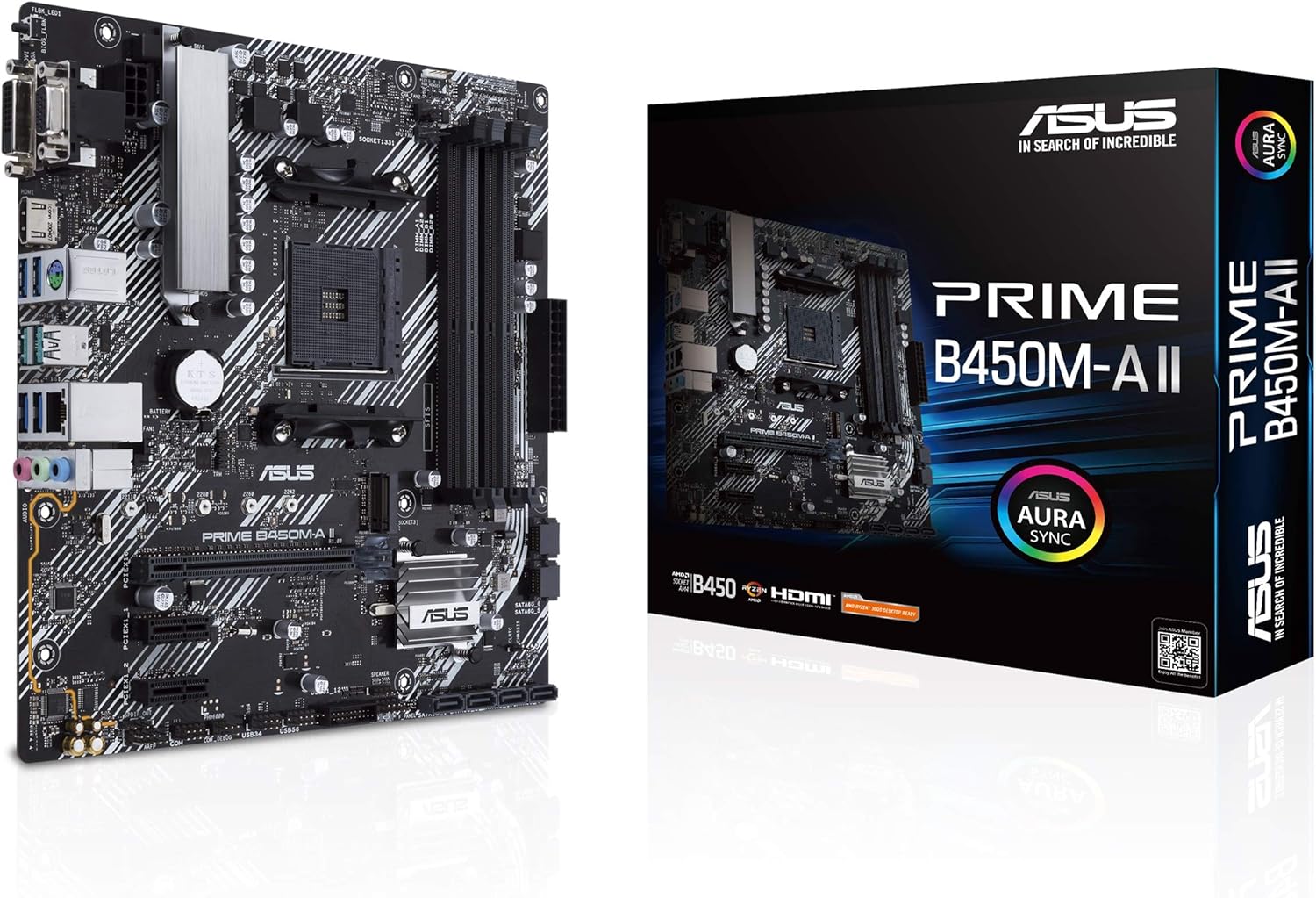
8. ASUS PRIME B450M-A II AMD AM4
 Compatible with the 5000 series this master motherboard is designed for maximum productivity. The AMD AM4 socket on the motherboard supports 3rd, 2nd and 1st generation of AMD Ryzen CPUs. The extensive surface area of the PCH heatsink provides comprehensive cooling. The thermal pads transfer heat away from the system to the heat sink. With flexible controls, you can manage fan speed according to your need and with quiet operation.
Also read: Best RAM for Ryzen 7 5800X
The premium-built design makes sure it lasts long. This motherboard has overcurrent, over voltage protection that too with stainless steel back. Dedicated audio layers make sure audio shielding and reduce interference. ASUS Armory Crate synchronizes LED effects across a wide range of compatible gear. Before installing the motherboard make sure your BIOS is up to date. RGB header allows for greater customization according to your style and needs.
SPECIFICATIONS
| CPU Socket | AM4 |
| Memory support | DDR4 |
| RAM | 128 GB |
| Chipset type | B450 |
| Graphic interface | PCIe 3 |
FEATURES
- DIY-friendly Pc with BIOS Flashback
- dedicated audio layer
- all rounded protection with LANGuard
- extensive heatsink surface area
- Great built quality
- Affordable
- Good overclocking support
- No DC support for CPU fan
- USB ports fail often
[su_button url=”https://www.amazon.com/ASUS-Prime-II-Motherboard-Flashback/dp/B08KH12V25?tag=hexa23-20″ target=”blank” background=”#0098D3″ center=”yes” size=”10″ rel=”sponsored”]Check Price[/su_button][su_divider top=”no” divider_color=”#0098D3″ link_color=”#0098D3″]
WHY BUY ASUS PRIME B450M-A II AMD AM4?
With an AM4 socket, ASUS PRIME B450M-A II AMD is the best Micro ATX Motherboard that is compatible with Ryzen 5000 series. The USB 3.2 generation ports have 10 GBps ultra-fast data transfer speed. On board M. 2 support with overclocking potential of 4400 MHz. Thermal pads are installed for better heat transfer. The fan speed controls provide for quiet cooling. With LANGuard overall protection the unit is built to last for long.
9. EVGA X299 Micro ATX 2
 EVGA X299 MICRO ATX 2 is a perfect top-of-the-line latest motherboard. The quad RAM setup supports a memory capacity of 128 GB. Like many other high-end motherboards, the EVGA X299 can support multiple graphic cards too. Though not a cheap purchase it comes as an affordable luxury purchase. For a powerhouse motherboard at a friendly cost look no further. The LGA 2066 Socket has support for the Intel Core X series. Metal reinforced slots are better and last longer.
Also read: Best Processors for Programming
New EVGA BIOS has a built-in BIOS stress test and an overclocking robot that auto overclocks your CPU. You can adjust per-core clock speed and voltage according to your gaming style. The efficient 14-phase power delivery phase delivers the most stable performance. Socket gold content is increased significantly to give it a modern look. The X299 Micro ATX 2 is designed to support intel’s powerful i9 series of CPUs.
SPECIFICATIONS
| CPU Socket | LGA 2066 |
| Memory Support | DDR4 |
| RAM | 128 GB |
| Chipset type | Intel X299 |
| Graphic interface | PCIe |
FEATURES
- 14-phase power delivery design
- Thick heatsink
- 6-pin PCIe power connector
- 6 Gbps SATA ports for fast access to data
- Robust BIOS
- Supports more than one GPU
- Great monitoring tools
- Slower at high workloads
[su_button url=”https://www.amazon.com/EVGA-Micro-Intel-Motherboard-121-SX-E296-KR/dp/B07J9KWHK7?tag=hexa23-20″ target=”blank” background=”#0098D3″ center=”yes” size=”10″ rel=”sponsored”]Check Price[/su_button][su_divider top=”no” divider_color=”#0098D3″ link_color=”#0098D3″]
WHY BUY EVGA X299 Micro ATX 2?
By buying EVGA X299 MICRO ATX 2 you can get high efficient 14-phase power delivery design. This design has extensive heatsinks that are actively cooled. Auto overclocking is now possible with the overclocking robot. You can adjust your overclocking speed and voltage according to your game plan and get maximum results. A high number of fast data transfer USB ports make it easy to manage all the data. This motherboard is also equipped with 6 SATA ports each one having a 6Gbps transfer rate.
Also read: Best CPUs for RTX 3070
FAQs About The Best Micro ATX Motherboards
1) Is a micro ATX Motherboard worth it?
Micro ATX Motherboards are cheaper than full-sized ones. They also take up a lot less space so you can work well with your small case. These smaller motherboards have generally less number of PCIe slots so you will be spending less money but compromising on efficiency.
2) Can Micro ATX Motherboard be used for gaming?
Micro ATX Motherboard is fit for budget gaming. For those who have a small CPU cabinet and like occasional average gaming the Micro board is the right one. They will save them lots of costs while delivering the performance of their choice.
3) what is the power supply of the best Micro ATX Motherboard?
The Micro ATX Motherboard are mini form factors that fit into the compact systems well. They require less power and connections and are thus economical and easy.
4) Can Micro ATX Motherboard fit a graphic card?
As these are small-sized boards so there might not be enough room to fit a big graphic card. The medium-sized ATX Motherboard can fit the graphic card with some effort.
5) Do micro ATX Motherboards need a special power supply?
The Micro ATX Motherboard works well with ATX cases and power supply. The ATX cases have standoff mounts for installing the micro ATX Motherboard. These boards being small need a lesser power supply and lesser space. You can save money by investing in a system that is compliant with your gaming requirements. The lesser power supply also means better cooling.
6) how to choose a power supply for my motherboard?
Consider the form factor, efficiency, protection, and the cables you need for establishing a stable power connection. A good and optimal power supply lasts for years and has important effects on your performance levels. Take you time to choose the right power design that will match your usage requirements. The motherboard usually requires between 50 to 150 watts.
Also read: Best Intel Motherboards
CONCLUSION
BEST BUDGET-FRIENDLY Micro ATX Motherboard
These best micro ATX Motherboards are compatible with Ryzen 5000 series. The AM4 socket supports many AMD generations of processors. The optimal and premium design provides enhanced productivity. Asus PRIME B450M-A has extensive heatsink surface area for rapid and continuous cooling. The stainless steel back adds to the strength of the board. Bright RGBs can be synchronized using the ASUS armory crate. To install this motherboard with your processor you need to upgrade BIOS. With a dedicated audio layer, you get the clearest audio with minimal interference. The 4000 MHz overclocking headroom is another reason for it being the budget pick.
BEST INTEL Micro ATX MOTHERBOARD
ASUS ROG Strix Z690-G Gaming WiFi 6E
ASUS ROG is a known and popular name when it comes to quality gaming equipment. This expensive luxury micro board can provide performance and features similar to those of full-sized ones. The impressive overclocking headroom allows you to reach speeds up to 6000 MHz. All these features are offered by ASUS ROG Strix at low power consumption. The multitude of USB ports ranges between t GBps to 20 GBps. You can either get a LAN 2.5 Gb Ethernet connection or set up WIFI 6 connectivity. This way you will have improved data transfer and response rate.
BEST VALUE FOR MONEY AMD Micro ATX MOTHERBOARD
ASUS TUF B550M-PLUS AMD AM4 Micro-ATX Motherboard
ASUS TUF is the top Micro ATX Motherboard for enthusiast gamers. This power pack motherboard has an AM4 socket making it compatible with the Ryzen processors. With 4 memory slots, you get a memory capacity of 128 GB. With this motherboard, you can enjoy high-end graphics. The thermal design is efficient and well monitored. It never lets the temperature shoot the upper range limited and maintains the performance quality. ASUS has made use of AI noise cancelation to cancel out fan noises and create an immersive gaming experience. For graphics, there are PCIe 4 slots that provide high resolution.
Also read: Best Motherboards for Ryzen 9 5900X